
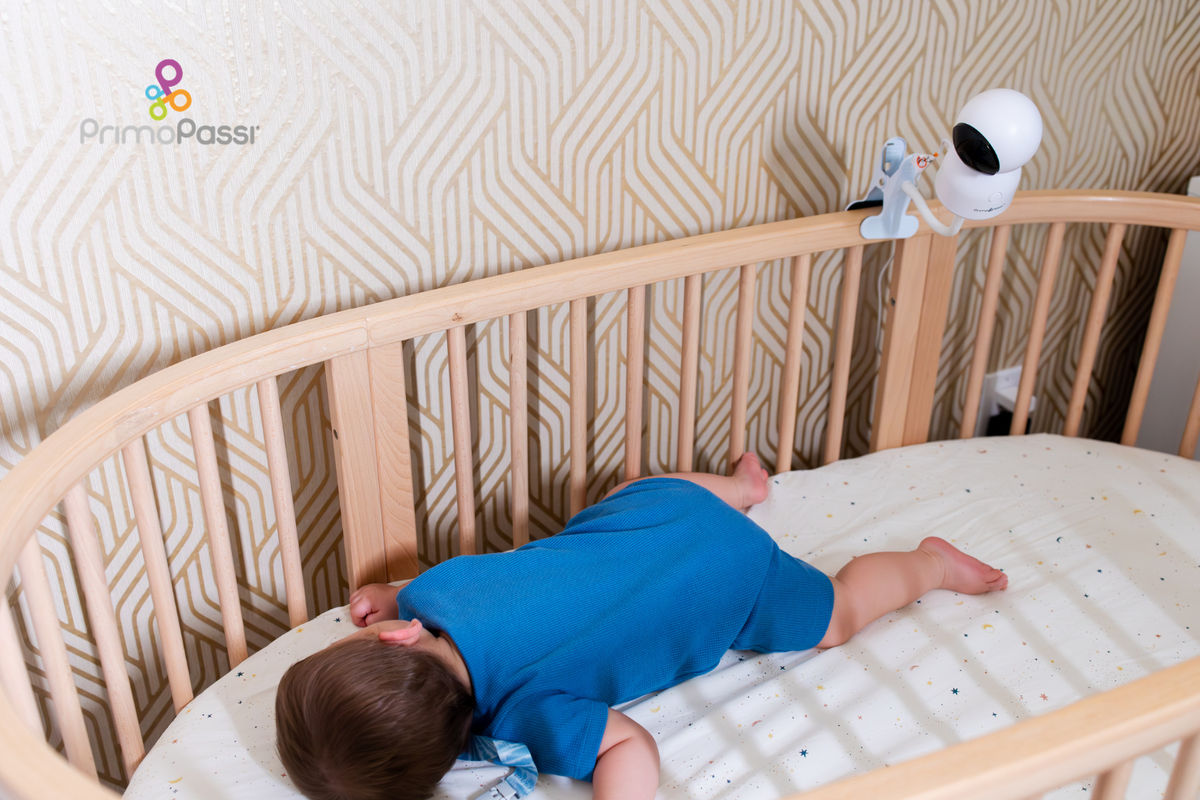
Quick Answer: Baby monitor safety comes down to three things: keep cords and cameras at least three feet from the crib to prevent strangulation, treat the monitor as a supplement to safe sleep practices, not a replacement for them, and if it's Wi-Fi enabled, secure the app with a strong password and two-factor authentication. Features like night vision, temperature alerts, and a non-Wi-Fi mode also add extra peace of mind.
A baby monitor is one of the first purchases most parents make, often before the crib is even assembled. It's easy to focus on picture quality or app features and treat the safety side as an afterthought. In reality, monitor safety has less to do with picking the fanciest model and more to do with a few well-documented habits: where you place it, how you use it alongside safe sleep practices, and how you secure it if it connects to the internet. None of these take more than a few minutes to get right, and together they cover almost everything that could potentially go wrong.
Cord and Camera Placement Safety
This is the safety issue with the most serious, well-documented history, and it has nothing to do with Wi-Fi. The U.S. Consumer Product Safety Commission has warned that cords on baby audio and video monitors present a strangulation hazard to infants and toddlers when placed within a child's reach, and has recorded infant deaths tied to monitor cords going back to 2002. The fix is straightforward and worth treating as non-negotiable:
- Keep the monitor and its cord at least three feet away from any part of the crib, bassinet, or play yard, and never inside or resting on the edge of one.
- Check wall-mounted monitors too. A cord mounted higher up can still hang within reach as a baby grows and starts pulling up to stand.
- If you use a battery-powered or wireless camera, you remove the cord risk almost entirely, which is one more reason cordless setups have become the default for most monitors sold today.
- Reassess placement every few months. What's out of reach for a newborn is well within reach for a six-month-old who can sit up and stretch.
A Baby Monitor Supplements Safe Sleep, It Doesn't Replace It
It's tempting to treat a monitor, especially one with breathing or movement tracking, as a safety net that lets you relax on the fundamentals. It shouldn't work that way. The core safe sleep practices recommended by pediatric health organizations remain the same whether or not a monitor is running: place babies on their back to sleep, use a firm sleep surface with a fitted sheet, and keep the crib clear of loose blankets, pillows, and stuffed animals. A monitor is there to help you check in without walking into the room every ten minutes, not to replace those habits or to serve as a substitute for a working smoke detector or a properly installed crib.
This distinction matters especially for monitors marketed around breathing or movement sensors. They can be a helpful data point, but they are not a substitute for pediatric guidance on any specific health concern, and a false sense of security from a sensor is its own kind of risk.
Room-sharing without bed-sharing is another common recommendation for the first several months, and a monitor fits naturally into that setup once a baby moves to their own room or a larger crib. The monitor becomes the way you keep the same level of awareness you had when the crib was a few feet from your bed, not a reason to skip the awareness altogether.
General Nursery Safety Beyond the Monitor
A monitor is one piece of a safer nursery, and it's worth glancing at a few related basics while you're setting one up. Crib slats should be no more than 2⅜ inches apart so a baby's head or limbs can't slip through. Keep the crib free of bumpers, pillows, and stuffed animals, all of which are more suffocation risk than comfort for an infant. If the nursery has blinds or curtains, use cordless versions or keep any cords well out of reach, the same strangulation logic that applies to monitor cords applies here too. And make sure outlets near the changing table or crib have covers, since a nursery tends to accumulate cords and cables from more than just the monitor.
Safety Features Worth Having
Beyond placement, a handful of monitor features make a real difference in day-to-day safety and peace of mind:
- Infrared night vision: Lets you see the baby clearly without a nightlight that could interfere with sleep.
- Room temperature alerts: Notifies you if the nursery gets too warm or too cold, both of which are worth adjusting for comfort and sleep safety.
- Sound-activated (VOX) screen: The display stays off until the monitor picks up noise, which means it's ready when needed without you having to stare at it constantly.
- Reliable range: A monitor that cuts out or lags between rooms defeats the purpose. Look for a stated range that comfortably covers your home.
- Two-way audio: Lets you soothe your baby with your voice without going into the room, useful for settling a baby back down between sleep cycles.

A Monitor Built Around These Basics
The Primo Passi Smart Baby Monitor covers this list directly: infrared night vision for clear low-light viewing, room temperature alerts, sound-activated VOX mode to save battery and reduce screen glare, a 1,000-foot range between the camera and the 5" parent display, and built-in two-way audio and lullabies for settling your baby without walking into the room. It also gives you the choice between Wi-Fi mode with mobile app access for convenience, and a non-Wi-Fi mode that runs on a private, closed-circuit connection with no cloud or app login involved, so you can pick whichever fits the moment.
Keeping the Wi-Fi Connection Secure
If your monitor connects to the internet, a few basic habits close off nearly all of the risk. This isn't a reason to avoid Wi-Fi monitors, it's a short setup checklist worth doing once:
- Change the default password to something long and unique, and never reuse a password from another account.
- Turn on two-factor authentication if the app offers it, so a password alone isn't enough to log in.
- Keep the app and firmware updated so known security fixes actually reach your device.
- Secure your home Wi-Fi network with WPA2 or WPA3 encryption and a strong router password.
- Disable remote access if you don't regularly check the monitor while away from home.
If you'd rather sidestep the internet altogether on certain nights, such as when guests are staying over or you're on an unfamiliar network, a monitor with a non-Wi-Fi mode lets you switch to a fully offline connection with nothing online to secure.
Signs Something Needs Attention
A quick monthly check covers both the physical and digital side of monitor safety:
- Cords or cables have shifted closer to the crib as the baby has grown or the furniture has moved
- The camera mount feels loose or the monitor has been bumped out of a secure position
- The camera moves on its own, or you hear unfamiliar sounds through the speaker
- The app shows a login or session you don't recognize
- The battery or backup power hasn't been tested recently
- Other cords nearby, like blind pulls or charging cables, have drifted closer to the crib as furniture gets rearranged
None of these take long to check, and folding them into a routine you already do, like a monthly nursery tidy-up, means they don't get forgotten once the newborn stage settles into a routine.
Baby Monitor Safety Checklist
Whether you're setting up a new monitor or double-checking an existing one, run through this list:
- Camera and cords are at least three feet from the crib, or the monitor is fully cordless
- Placement has been rechecked since the baby started sitting up or pulling to stand
- The monitor supplements, and doesn't replace, safe sleep basics: back sleeping, a firm mattress, and a clear crib
- The app password is strong and unique, with two-factor authentication turned on if available
- Firmware and the app are set to update automatically
- You know how to disable remote access, or the monitor offers a non-Wi-Fi mode for full offline use
Frequently Asked Questions
How far should a baby monitor cord be from the crib?
At least three feet away from any part of the crib, bassinet, or play yard, and never inside or resting on the edge of the crib. Cordless or wireless cameras remove this risk entirely.
Does a baby monitor help prevent SIDS?
No monitor, including ones with breathing or movement sensors, is a substitute for established safe sleep practices such as back sleeping, a firm mattress, and a crib free of loose bedding. A monitor can help you check in on your baby, but it shouldn't be relied on as a medical safety device.
Is a Wi-Fi baby monitor safe to use?
Yes, for the large majority of parents, as long as the app is secured with a strong, unique password and two-factor authentication when it's available. Most security incidents trace back to a default password that was never changed rather than a flaw in Wi-Fi monitors themselves.
When can I move the baby monitor further from the crib?
As soon as your baby can sit up, pull to stand, or reach outward, which typically starts around four to six months, recheck placement. What was out of reach for a newborn often isn't for an older baby, so the monitor and its cord may need to move further away.
What's the most important baby monitor safety habit?
Keeping the monitor and any cords well out of the crib and out of your baby's reach. This single habit addresses the most serious, well-documented monitor safety risk, and it applies to every type of monitor, Wi-Fi or not.
Should I use a monitor with a non-Wi-Fi mode?
It's not required, but it's a useful option. A non-Wi-Fi mode lets you use a fully offline connection whenever you'd rather not think about network security at all, while still giving you the choice of Wi-Fi and app access when convenience matters more.
Do I need a video monitor, or is audio-only enough?
It depends on what gives you peace of mind. Audio-only monitors cover the basics of hearing when a baby wakes or is fussing, and tend to be simpler to set up and secure since there's less connected to the internet. Video adds the ability to actually see what's going on without walking into the room, which many parents find worth the extra setup. Neither option is inherently safer than the other as long as placement and, for Wi-Fi models, account security are handled correctly.